When I started learning about freelancing, I thought the main challenge would be finding clients and completing projects on time. Later, I realized that managing invoices and payments can also take a lot of time. Creating invoices manually, checking payment details, calculating totals, and following up with clients can become frustrating, especially when you have several projects at the same time.
This is where simple invoice software can make life much easier for freelancers. Instead of creating every invoice from scratch, I can use invoice software to prepare professional invoices within a few minutes. It also helps me keep my payment records organized and makes it easier to know which clients have paid and which payments are still pending.
In my opinion, good invoice software does not need to be complicated. Freelancers usually need simple features that save time and reduce mistakes. In this article, I will explain what simple invoice software is, why freelancers need it, which features are important, and how it can make freelance work more organized.
What Is Simple Invoice Software?
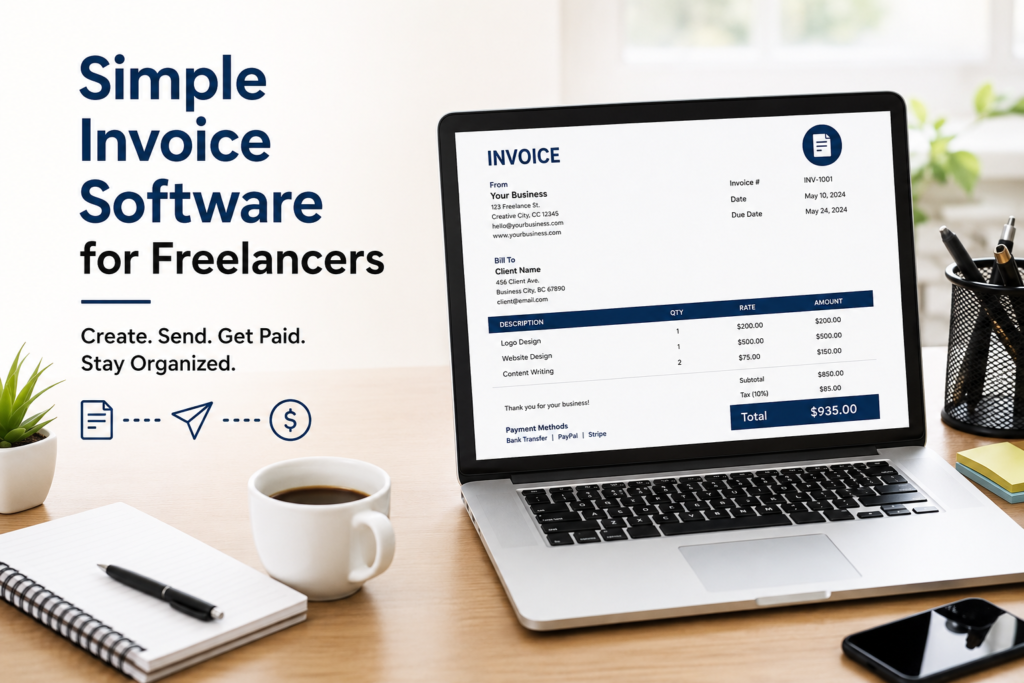
Simple invoice software is a digital tool that helps freelancers create, send, manage, and track invoices. Instead of using a document editor or spreadsheet for every invoice, I can enter my client information, project details, services, prices, and payment terms into the software.
The software then creates an invoice in a professional format. I can usually send it directly to the client by email or download it as a PDF.
Some invoice tools also allow freelancers to track payments, send reminders, manage recurring invoices, and keep records of previous invoices. These features can be useful when working with multiple clients.
I believe the biggest benefit is convenience. Once the basic information is saved, creating another invoice becomes much faster.
Why Freelancers Need Invoice Software
Freelancers often work independently, which means they are responsible for both their work and their business administration. An invoice may look like a simple document, but it is an important part of getting paid.
When I create invoices manually, there is always a chance of making a mistake. I might enter the wrong amount, forget an important detail, or accidentally use an old invoice number.
Invoice software reduces these problems by providing a consistent format. It can also help me maintain a record of my invoices in one place.
Another important reason is professionalism. A clear and well organized invoice can make a freelancer look more serious and reliable. Clients can easily understand what they are being charged for, how much they need to pay, and when the payment is due.
For me, saving time is another major advantage. If software can reduce invoice preparation from twenty minutes to five minutes, that extra time can be used for client work or finding new projects.
Important Features to Look For
Not every freelancer needs expensive accounting software. If my main requirement is creating and managing invoices, I would first look for a simple tool with useful features.
Easy Invoice Creation
The first feature I would look for is an easy invoice creator. I should not need advanced accounting knowledge to prepare an invoice.
The software should allow me to enter the client name, contact information, service description, quantity, rate, total amount, invoice number, and payment date without making the process confusing.
A clean interface is important because freelancers want to spend more time working and less time learning complicated software.
Professional Templates
A professional template can make a big difference. I prefer invoices that look clean and easy to read.
Many invoice tools provide different templates that allow users to add their business name, logo, contact information, and payment details.
A professional design can also make it easier for clients to understand the invoice. In my opinion, simple designs are usually better than invoices filled with unnecessary information.
Automatic Calculations
Calculating totals manually can lead to mistakes. Invoice software can automatically calculate the amount based on quantity and price.
Some tools can also calculate taxes or discounts when needed. This is especially useful when an invoice contains several services.
For example, if I provide three different services to one client, I do not want to calculate every amount with a calculator. Automatic calculations make the process faster and reduce the chance of errors.
Payment Tracking
Payment tracking is another feature I find very useful. When I work with several clients, it can become difficult to remember who has paid and who has not.
Invoice software can show whether an invoice is paid, unpaid, overdue, or partially paid.
This gives me a quick overview of my income. Instead of searching through emails or bank records, I can check the software and see my invoice status.
Payment Reminders
Following up about payments can sometimes feel uncomfortable. However, freelancers need to make sure they receive payment for their work.
Some invoice software allows automatic payment reminders to be sent when an invoice becomes due or overdue.
I think this feature is helpful because it removes some of the pressure from the freelancer. The reminder can be professional and polite without requiring me to write the same message repeatedly.
PDF Invoices
PDF support is also important. Many clients prefer receiving invoices as PDF documents because they are easy to open and save.
A good invoice tool should allow me to download or send invoices as PDF files. This also gives me a permanent copy for my records.
Benefits of Using Simple Invoice Software
The biggest benefit is time saving. Freelancers already have many responsibilities, including communicating with clients, completing projects, marketing services, and managing finances.
Invoice software can reduce the amount of administrative work.
Another benefit is better organization. Instead of keeping invoices in different folders, I can manage them through one system.
It can also improve accuracy. Automatic calculations and saved client information reduce the possibility of entering the wrong details.
Professional invoices can also improve communication with clients. When everything is clearly mentioned, there is less chance of confusion about the project price or payment deadline.
I also like the fact that digital invoices are easier to store. If I need to check an old invoice, I can search for it instead of looking through a stack of documents.
Free vs Paid Invoice Software
Freelancers often wonder whether they should use free or paid invoice software. In my opinion, the answer depends on the size of the freelance business.
If I am just starting freelancing and only send a few invoices each month, a free tool may be enough. Many free options provide basic invoice creation and PDF features.
As the business grows, paid software may become more useful. Paid plans can include features such as advanced payment tracking, recurring invoices, additional templates, reports, and more automation.
I would not pay for features I do not need. My approach would be to start with a simple option and upgrade only when the business actually requires more features.
How Freelancers Can Use Invoice Software
Using invoice software is usually straightforward. First, I would create my freelancer profile and enter my business information.
Then I would add my client information. After that, I would enter the services I provided and their prices.
Before sending the invoice, I would carefully check the client name, invoice number, service description, total amount, payment method, and due date.
Once everything looks correct, I can send the invoice to the client.
After sending it, I would use the payment tracking feature to monitor its status. If the payment is late, I can send a reminder.
This simple process can make freelance administration much easier.
Common Mistakes Freelancers Should Avoid
Even with invoice software, freelancers should still check their invoices carefully.
One common mistake is forgetting to include a payment due date. Clients should know when payment is expected.
Another mistake is not providing enough information about the service. A clear description helps the client understand exactly what they are paying for.
I also recommend keeping invoice numbers organized. Every invoice should have a unique number so it can be easily identified later.
Freelancers should also avoid sending an invoice without checking the total amount. Automatic calculations are helpful, but reviewing the final invoice is still important.
Another mistake is ignoring unpaid invoices. If a client does not pay on time, it is better to follow up professionally rather than waiting indefinitely.
What Makes Invoice Software Simple?
For me, simplicity means the software should be easy to understand without requiring a long learning process.
A good invoice tool should have a clean dashboard, simple navigation, clear buttons, and useful features without unnecessary complexity.
I do not need dozens of business management features if I only want to create and track invoices.
The best software is the one that solves the problem without creating another problem. If I spend more time trying to understand the software than creating an invoice, then it is probably not the right tool for me.
Final Thoughts
Simple invoice software can be a valuable tool for freelancers. It can save time, reduce calculation mistakes, organize payment records, and help create professional invoices.
From my point of view, freelancers should not choose software simply because it has the largest number of features. I would focus on what I actually need.
Easy invoice creation, professional templates, automatic calculations, payment tracking, PDF support, and payment reminders are enough for many freelancers.
When freelance work starts growing, keeping financial records organized becomes increasingly important. A simple invoice tool can take care of a large part of this process and allow freelancers to focus more on their actual work.
I believe the goal of invoice software should be simple. Create an accurate invoice, send it to the client, track the payment, and keep a proper record. If a tool can do these things easily, it can be a useful part of any freelancer’s daily workflow.
For someone starting freelancing, I would recommend choosing a simple invoice solution first. Learn how it works, use it regularly, and upgrade only when your business needs more features. In the long run, good invoice management can make freelance work feel more professional, organized, and stress free.